
Introduction
SFHound is an open-source data collector and graph builder for Salesforce organisations. It queries the Salesforce REST, Tooling, and Metadata APIs using a JWT-authenticated Connected App, then emits a BloodHound OpenGraph-compatible JSON file that BloodHound CE ingests directly.
The result is a navigable property graph of every identity, permission, and relationship in your Salesforce org — queryable with Cypher and traversable with BloodHound’s shortest-path engine.
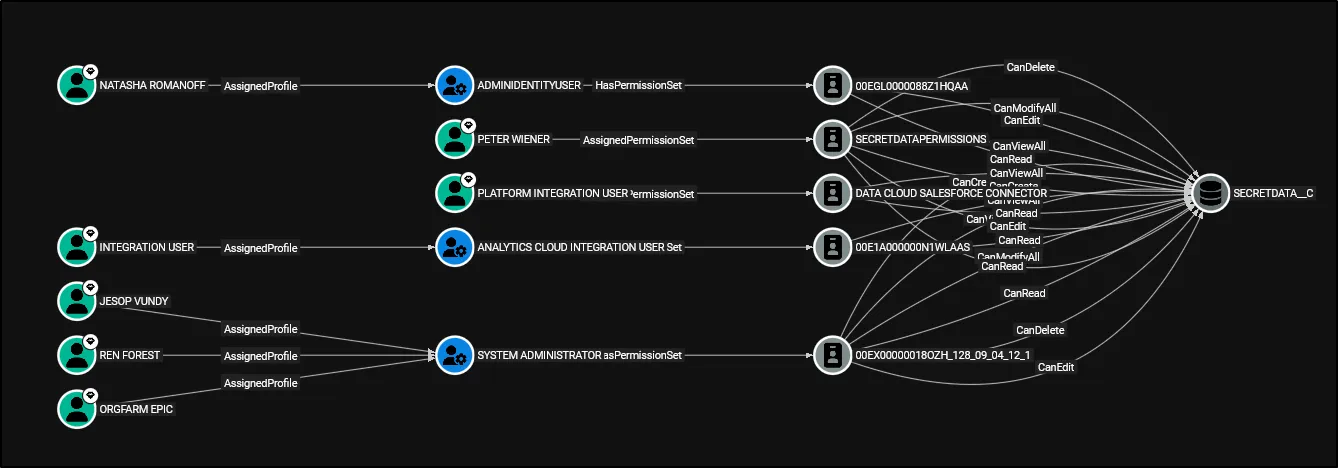
What SFHound collects
| Category | What is extracted |
|---|---|
| Users | All active and inactive User records with key profile attributes |
| Profiles | Every Profile with its backing PermissionSet and system permission flags |
| Permission Sets | Standalone Permission Sets, including aggregate sets owned by groups |
| Permission Set Groups | Groups of Permission Sets with constituent membership |
| Role Hierarchy | Every Role and its parent/child relationships |
| Public Groups & Queues | Group membership (direct and nested), Queue SObject ownership |
| Object Permissions | CRUD and ViewAll/ModifyAll flags per object per Profile/PermissionSet |
| Field Permissions | IsVisible and ReadOnly FLS edges per field per Profile/PermissionSet |
| Connected Apps | OAuth apps with admin-approval settings and creator provenance |
| OWD Settings | InternalSharingModel and ExternalSharingModel on every SObject |
Core capabilities
Identify, Analyse, and Execute Attack Paths
BloodHound’s shortest-path queries run natively on SFHound’s output. In seconds you can answer:
- Which users have a path to
ModifyAllData? - What is the shortest chain from a compromised user to
AuthorApex? - Who can bypass all sharing rules via
CanModifyAllon a custom object?
Audit Identity and Access Management
SFHound surfaces both the configurations (what permissions exist) and the outcomes (which humans hold which permissions through any combination of assignment). The role hierarchy, nested group membership, and Permission Set Group expansion are all resolved in the graph.
Map Field and Object-Level Permissions
Every CanRead, CanEdit, CanDelete, CanViewAll, CanModifyAll, IsVisible, and ReadOnly relationship is modelled as a typed edge. Field-Level Security queries that would require dozens of SOQL joins become single-hop Cypher matches.
Enumerate OAuth and API Attack Surface
CanAuthorize edges link Profiles and Permission Sets to the Connected Apps their holders may authorise. CreatedBy edges record which admin registered each app — useful for provenance audits and insider-threat investigations.
Design principles
System permissions as edges, not nodes. Rather than storing PermissionsModifyAllData = true as a node property, SFHound emits a ModifyAllData edge from the granting Profile/PermissionSet to the central SFOrganization node. This means MATCH (u:SFUser)-[*1..5]->()-[:ModifyAllData]->(org:SFOrganization) is all you need.
No dangling edges. Aggregate PermissionSet nodes generated internally by Salesforce for every PermissionSetGroup (the 0PSG… IDs) are materialised as placeholder nodes so every CRUD and FLS edge has a fully-anchored source.
Shared SObject lookup. Both object-permission and queue-ownership builders resolve SObject API names through the same QualifiedApiName → DurableId lookup, ensuring consistent node IDs across all edge types.
Limitations
- Individual
SharingRulemetadata (AccountSharingRule, etc.) requires the Salesforce Metadata API and is not currently extracted. OWD settings are captured per object. - Queue and group membership in very large orgs (100 000+
GroupMemberrecords) may be slow to extract. - Field permission extraction can produce a large number of edges; consider scoping to custom fields for initial analysis.
- Auto-ingest does not clear the BloodHound database before loading. Clear it manually if you need a clean slate.
Tested environments
| Environment | Status |
|---|---|
| Developer Edition | ✅ Tested |
| Sandbox | ✅ Tested |
| Production (small–medium) | ⚠️ Likely works; feedback welcome |
| Production (large, 10 000+ users) | ⚠️ May be slow; field permissions especially |
Next steps
- Quickstart — install, configure, and run the collector
- Data Model — full node and edge reference
- High-Risk Permissions — Tier Zero classification